
It is important for agency admins to keep the counselor accounts on Happy Mango up to date. Active counselor accounts are visible to your clients. If a counselor has left your organization while his or her account is still active on Happy Mango, your clients may end up choosing or communicating with the departed counselor and never get the help they need.
As the agency admin, you should perform the following steps to remove this counselor's access immediately when the counselor no longer needs access to Happy Mango:
Step 1. Re-assign the departing counselor's clients to another counselor at the organization
Click here for an article on how to switch a client's counselor to another.
Step 2. Deactivate or delete the departing counselor's account on Happy Mango
Using the "Advisors" function form the top right drop down menu, the agency admin can manage the financial counselors within her agency. The agency admin can deactivate or delete a departing counselor. Deactivated counselor accounts will remain on Happy Mango and can be activated again later. Deleted counselor accounts will be permanently removed from Happy Mango.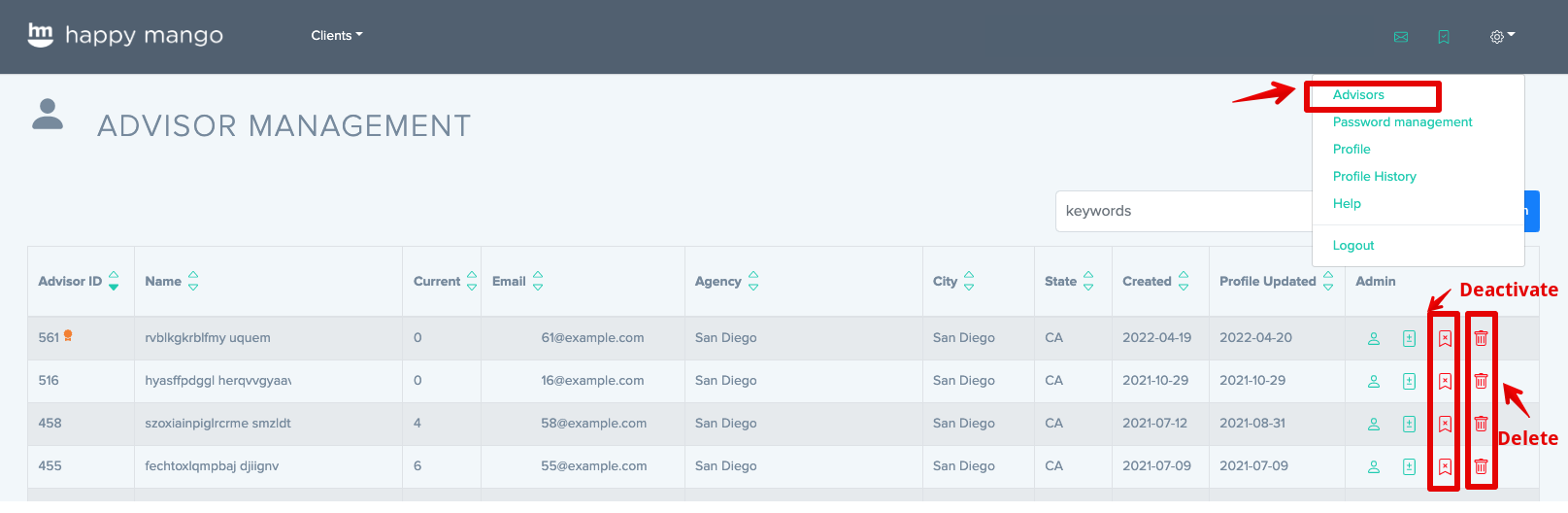
Step 3. Add the new counselor's account on Happy Mango
The agency admin can add a new counselor on the page shown above by clicking on the "New Advisor" link on top right of this page.
Comments
0 comments
Please sign in to leave a comment.